Technické Dokumenty
Špecifikácie
Brand
StarTech.comVstup videa
Mini DisplayPort
Video výstup
VGA
Počet video výstupů
1
Maximální rozlišení
1920 x 1200
Délka kabelu
102mm
Krajina pôvodu
China
Podrobnosti o výrobku
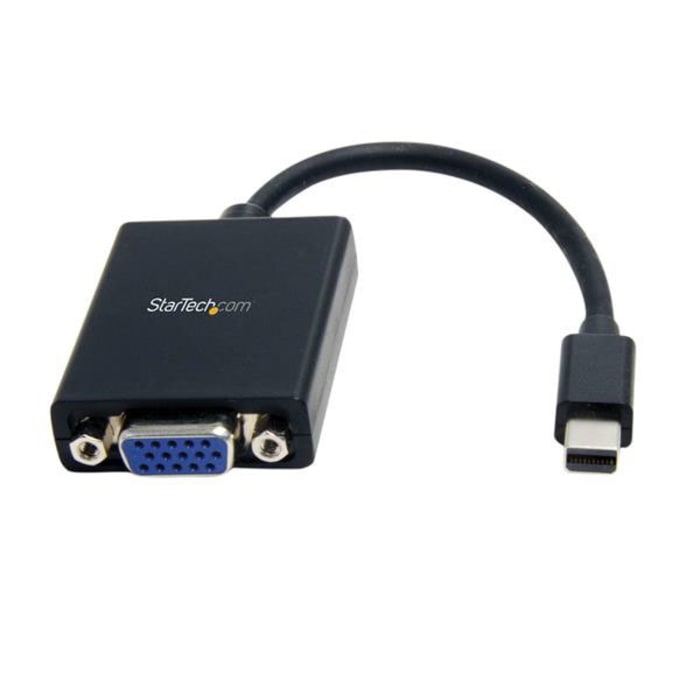
This Mini DisplayPort to VGA adapter lets you connect your mDP computer to a VGA monitor or projector. The adapter works with Mini DisplayPort computers like your Ultrabook™ or Microsoft® Surface.
Easily connect your Mini DisplayPort computer to a VGA display
The mDP to VGA adapter lets you connect your Mini DisplayPort laptop, desktop or tablet to a VGA display. The adapter is compatible with mDP ports as well as Thunderbolt 1 and Thunderbolt 2 I/O ports, and supports plug-and-play connectivity ensuring a hassle-free setup.
Works with legacy VGA monitors
The Mini DisplayPort adapter makes your mDP computer fully compatible with existing VGA monitors or projectors in your home or around your office. The VGA connector features nuts that mate with the screws on standard VGA cables, to ensure your video cable wont get disconnected.
Designed for maximum portability
The Mini DisplayPort to VGA converter maximizes portability with a compact, lightweight design, making it the perfect travel accessory to carry with your Surface Pro or Ultrabook, fitting easily into your laptop bag or carrying case. This ultra-portable design makes this adapter perfect for BYOD (Bring Your Own Device) applications at the office.
Crystal-clear picture quality
With support for video resolutions up to 1920x1200 or 1080p, youll be surprised at the picture quality the adapter provides, even when connected to a legacy VGA monitor, projector or television. The adapter harnesses the video capabilities built into your mDP connection to deliver every detail in stunning high-definition.
The MDP2VGA is backed by a 2-year StarTech.com warranty and free lifetime technical support.
This device is plug and play. It does not use any drivers, and does not require any setup tasks other than plugging in the source (for example, a computer) and the destination (for example, a monitor).

Informácie o zásobách sú dočasne nedostupné.
P.O.A.
1
P.O.A.
Informácie o zásobách sú dočasne nedostupné.
1
Technické Dokumenty
Špecifikácie
Brand
StarTech.comVstup videa
Mini DisplayPort
Video výstup
VGA
Počet video výstupů
1
Maximální rozlišení
1920 x 1200
Délka kabelu
102mm
Krajina pôvodu
China
Podrobnosti o výrobku
This Mini DisplayPort to VGA adapter lets you connect your mDP computer to a VGA monitor or projector. The adapter works with Mini DisplayPort computers like your Ultrabook™ or Microsoft® Surface.
Easily connect your Mini DisplayPort computer to a VGA display
The mDP to VGA adapter lets you connect your Mini DisplayPort laptop, desktop or tablet to a VGA display. The adapter is compatible with mDP ports as well as Thunderbolt 1 and Thunderbolt 2 I/O ports, and supports plug-and-play connectivity ensuring a hassle-free setup.
Works with legacy VGA monitors
The Mini DisplayPort adapter makes your mDP computer fully compatible with existing VGA monitors or projectors in your home or around your office. The VGA connector features nuts that mate with the screws on standard VGA cables, to ensure your video cable wont get disconnected.
Designed for maximum portability
The Mini DisplayPort to VGA converter maximizes portability with a compact, lightweight design, making it the perfect travel accessory to carry with your Surface Pro or Ultrabook, fitting easily into your laptop bag or carrying case. This ultra-portable design makes this adapter perfect for BYOD (Bring Your Own Device) applications at the office.
Crystal-clear picture quality
With support for video resolutions up to 1920x1200 or 1080p, youll be surprised at the picture quality the adapter provides, even when connected to a legacy VGA monitor, projector or television. The adapter harnesses the video capabilities built into your mDP connection to deliver every detail in stunning high-definition.
The MDP2VGA is backed by a 2-year StarTech.com warranty and free lifetime technical support.
This device is plug and play. It does not use any drivers, and does not require any setup tasks other than plugging in the source (for example, a computer) and the destination (for example, a monitor).